
Everything about your child, in one place.
Photograph or upload any letter, report or assessment and Child Organiser files it for you: the appointment goes in the diary with a reminder, the document is saved, the contacts are added, and what the report says your child can do is kept as a growing portfolio. Plus a one-page passport for every school, club and doctor.
Free. Sign in with your IncludeMe account, the same email and password as the Activity Finder.
What it does
Scan it once. Use it everywhere.
Scan a letter once and everything that matters is filed. Print it, share it, or keep it ready for the next meeting.
Scan or upload anything
Photograph or upload a letter, text, prescription, report or assessment: a photo, a PDF, a Word file or plain text. It reads it, you check it, then it files it. Long reports are read page by page, and letters scanned together are saved as one PDF.
A diary that reminds you
Appointments from your letters go straight into the diary, as a list or a calendar, with email and phone reminders (three days before by default) and a one-tap add to your phone calendar.
A portfolio that builds up
What reports and assessments say your child can do, is working on, finds hard and enjoys, sorted by area. A newer report moves older lines to Earlier, so you see progress and nothing is lost. A short summary can be kept up to date in About my child.
Contacts and documents
Clinics, doctors and schools from your letters are added to a contacts list. Keep reports, letters and photos of any file type with the profile, each in a tidy row you can open.
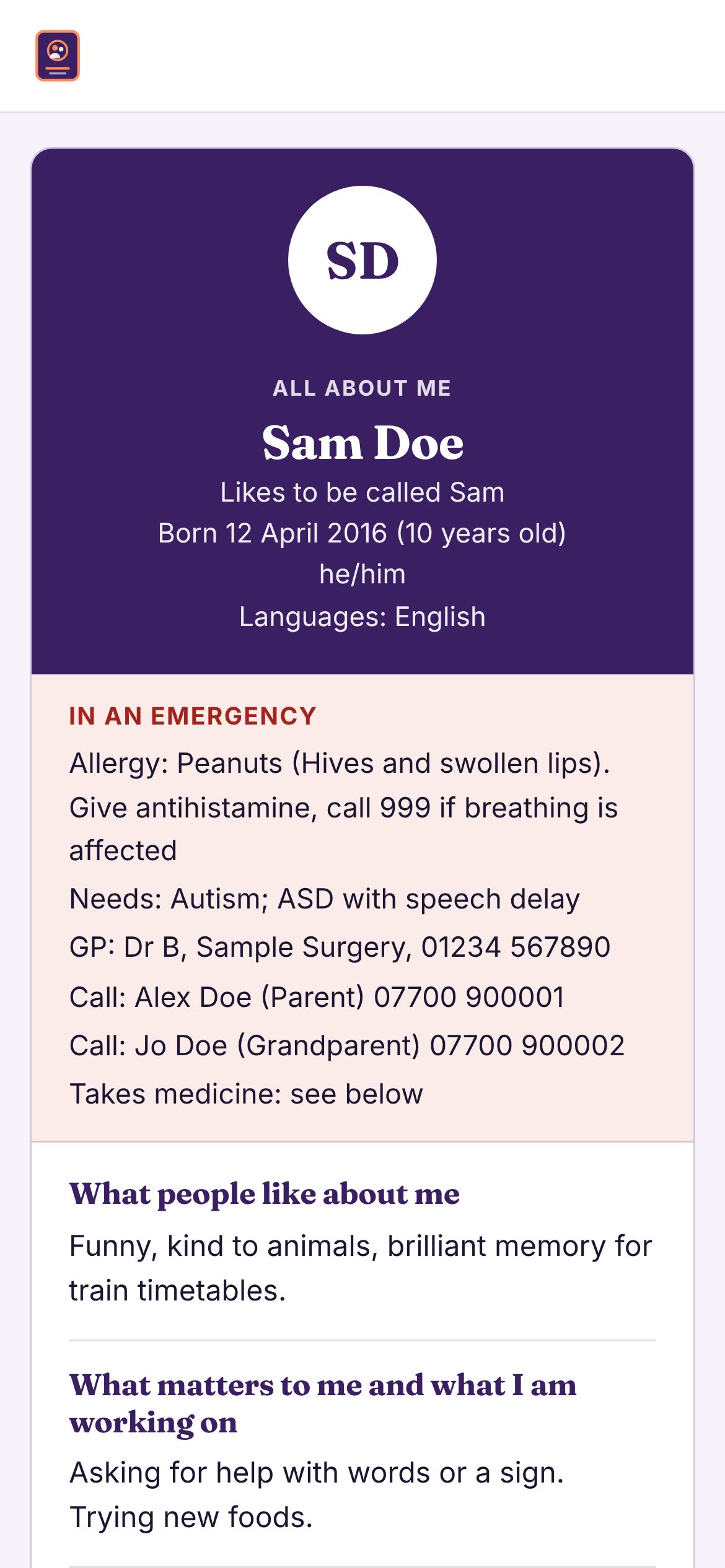
A one-page passport
How they communicate, what helps and upsets them, sensory needs, food, sleep and staying safe, medicines, allergies and doctors, with an emergency summary at the top.
Choose what to share
Leave out the NHS number, medicines, contacts or what the reports say for a particular club or school before you print or send it. An emergency card fits in a wallet or school bag.
On every phone
Save it to your iPhone or Android Home Screen in a minute, and it updates itself. Turn on the optional private copy and the same details and documents appear on your other phone too.
Checked by you
Nothing is saved until you tick it. Anything that would replace what you have written is left unticked and clearly marked, and you can undo it.
One for each child
Add as many children as you need and switch between them in a tap.
How it works
Three steps.
- Sign in with your IncludeMe email and password (the same as the Activity Finder), or create a free account.
- Scan or upload a letter, report or assessment. You agree first, and it takes a few seconds a page.
- Check it and save. Tick what is right: the appointment, the document, the contacts, the details and what the report says. Then print or share the passport when you need it. A shared link opens without an account.
Privacy
Your child’s details are yours.
- Details are saved on your own phone or computer. A private copy on our server is optional: you choose it, it is encrypted, and you can turn it off or delete it any time.
- When you scan or upload, the pages are sent to an AI service to be read, but only once you agree. They are not stored and not kept in any log, and you check everything before it is saved.
- Documents are never in a link or printout. What reports say about your child is left out unless you choose to include it.
- You decide what each printout, copy or link includes.
- It is not a medical record, and the reading can make mistakes. Check medicines against the label or your pharmacist.
Questions
Good to know.
Is it really free?
Yes. Child Organiser is free to use, including scanning and reading your letters and reports. You only need an IncludeMe account, which is also free. Reading has a fair-use limit each day and each month.
Do I need a new account?
No. If you already use the Activity & Therapy Finder, sign in with the same email and password. Otherwise you can create an account in a minute.
What can I scan or upload?
Photos of letters, texts, prescriptions, reports and assessments, and PDF, Word or text files. Anything else, such as a spreadsheet or a video, is kept in Documents as it is, up to 25 MB a file. Long PDFs are read page by page.
What happens to what I scan?
Once you agree, the pages are sent to an AI service to be read, then the words come back for you to check. We do not store the pages or the words, and they are not kept in any log. Nothing is saved until you tick it. You can also choose “Just file it, do not read” to keep a photo without it being sent anywhere.
Is the reading always right?
No. It can misread a date, a name or a dose. That is why you check everything first, and why anything that would replace something you wrote yourself is left unticked. Always check medicines against the label or your pharmacist.
What is the portfolio?
A growing record of what reports and assessments say your child can do, is working on, finds hard and enjoys, sorted by area such as movement, communication and sleep. When a newer report updates something, the older line moves to Earlier and stays as history. It can keep a short summary up to date in About my child.
Can I use it on more than one phone?
Yes. Details are kept on each device by default. If you turn on the optional private copy, the same details, documents and portfolio appear when you sign in on another phone or the Home Screen app. The copy is encrypted, is never shared or used to train AI, and you can turn it off or delete it any time.
Is there an app to download?
Not from an app store. It is a website that you save to your Home Screen so it opens like an app, on iPhone, Android or a computer. The app shows you how, step by step, and it keeps itself up to date.
What if I lose my phone?
If you use the private copy, sign in on a new phone and your details come back. Otherwise use the backup option in the account menu and save a backup now and then. You can load it on any device.
Is this medical or legal advice?
No. It helps you keep information in one place. Check medicines against the label or your pharmacist.
Ready to scan your first letter?
It takes a few minutes to start, and you can add more any time.
Open Child Organiser